
Documentation
Overview
Threat intelligence, also known as cyber threat intelligence (CTI), is actionable information about current and emerging cyber threats that helps…
Overview
What is Threat Intelligence?
Threat Intelligence is structured information about known or suspected cyber threats, such as malicious IP addresses, suspicious domains, TOR exit nodes, and other indicators of compromise. In CYBERQUEST, this information is used to enrich detection, improve event analysis, and support faster identification of potentially malicious activity.
Threat intelligence helps security teams answer key investigation questions:
- What indicators are associated with known threats?
- Where is suspicious activity coming from?
- Which IP addresses or domains should be monitored or blocked?
- How can threat context improve alert analysis and response?
The Value of Threat Intelligence
Threat intelligence helps transform raw security data into actionable context. Instead of analyzing events without background information, analysts can compare network activity, logs, and alerts against known malicious indicators.
Key benefits include:
- Proactive defense: Enabling organizations to anticipate and prepare for threats before they materialize, rather than simply reacting to incidents after they occur.
- Risk prioritization: Helping security teams focus their efforts on the most relevant and high-impact threats to their specific environment.
- Faster incident response: Providing contextual information that accelerates investigation and response times during security incidents.
- Strategic decision making: Supporting executive-level decisions about security investments, risk management, and resource allocation.
Threat Intelligence Settings in CYBERQUEST
The Threat Intelligence settings section allows administrators to configure and manage threat intelligence sources used by CYBERQUEST. These sources can include IP-based feeds, domain indicators, TOR exit nodes, and active blocklists.
To access this section, go to Settings > Application Settings > Threat Intelligence.
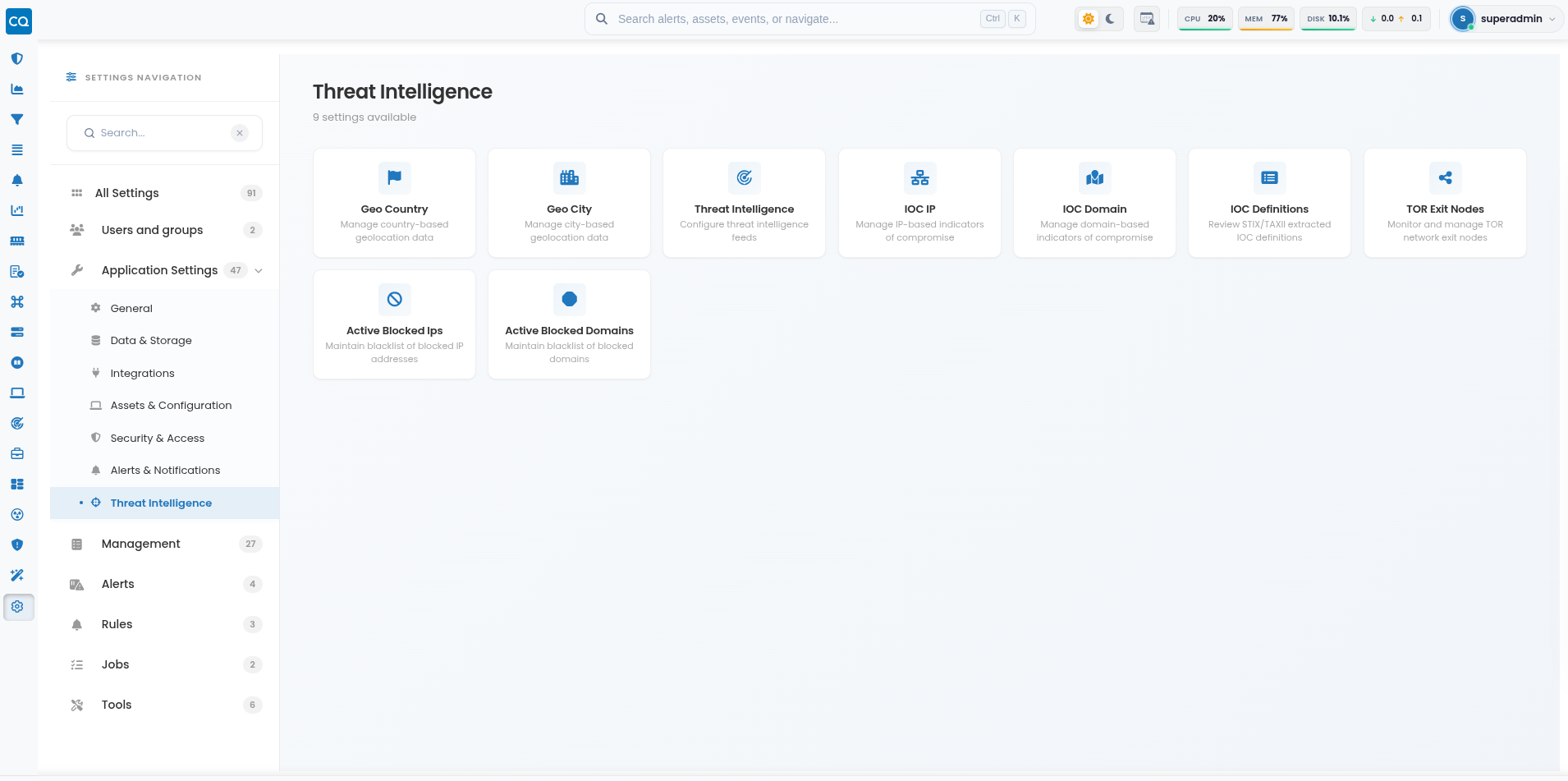
The Threat Intelligence settings area displays the available configuration categories, including:
- Geo Country - Manages country-based geolocation data.
- Geo City - Manages city-based geolocation data.
- Threat Intelligence - Configures threat intelligence feeds.
- IOC IP - Manages IP-based indicators of compromise.
- IOC Domain - Manages domain-based indicators of compromise.
- TOR Exit Nodes - Monitors and manages TOR network exit nodes.
- Active Blocked IPs - Maintains the active blacklist of blocked IP addresses.
- Active Blocked Domains - Maintains the active blacklist of blocked domains.
Add a Threat Intelligence Source
To add a new threat intelligence source, click the  button. This opens the configuration window where a new source can be defined.
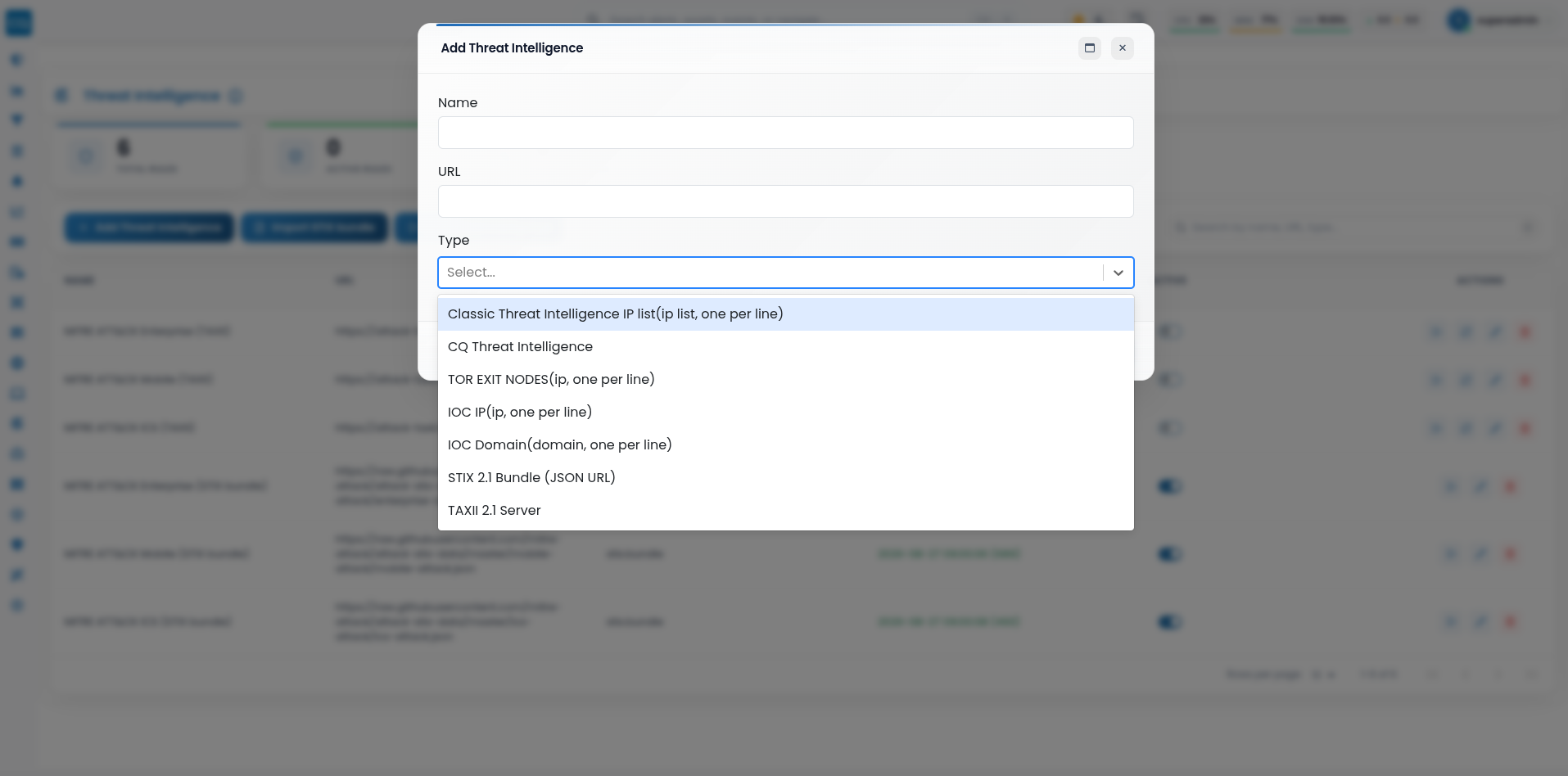
The following fields are available:
- Name - Defines the name of the threat intelligence source. Use a clear and descriptive name so the source can be easily identified later.
- URL - Specifies the location of the threat intelligence feed or source file. This can be used to retrieve the indicators that will be imported or processed by CYBERQUEST.
- Type - Defines the format and purpose of the threat intelligence source. The selected type determines how the imported data will be interpreted.
Available source types include:
Classic Threat Intelligence IP List - Used for IP address lists, with one IP address per line. This is suitable for external or internal lists of suspicious or malicious IP addresses.
CQ Threat Intelligence - Used for CYBERQUEST threat intelligence sources.
TOR Exit Nodes - Used for lists of TOR exit node IP addresses, with one IP address per line. These indicators help identify traffic associated with TOR network exit points.
IOC IP - Used for IP-based indicators of compromise, with one IP address per line. These indicators may represent malicious infrastructure, command-and-control servers, or attacker-controlled systems.
IOC Domain - Used for domain-based indicators of compromise, with one domain per line. These indicators may include phishing domains, malware distribution domains, or suspicious command-and-control domains.
STIX 2.1 Bundle (JSON URL) - Imports STIX 2.1 content from a JSON bundle available at a specified URL.
TAXII 2.1 Server - Connects CYBERQUEST to a TAXII 2.1 server for retrieving structured threat intelligence.
Configured Threat Intelligence sources are displayed in the Threat Intelligence page together with their source type, synchronization status, activation state, and available management actions.
CYBERQUEST also provides an Import STIX bundle option for manually importing STIX 2.1 content. The bundle can be provided either by uploading a .json file or by pasting the JSON content directly into the interface.
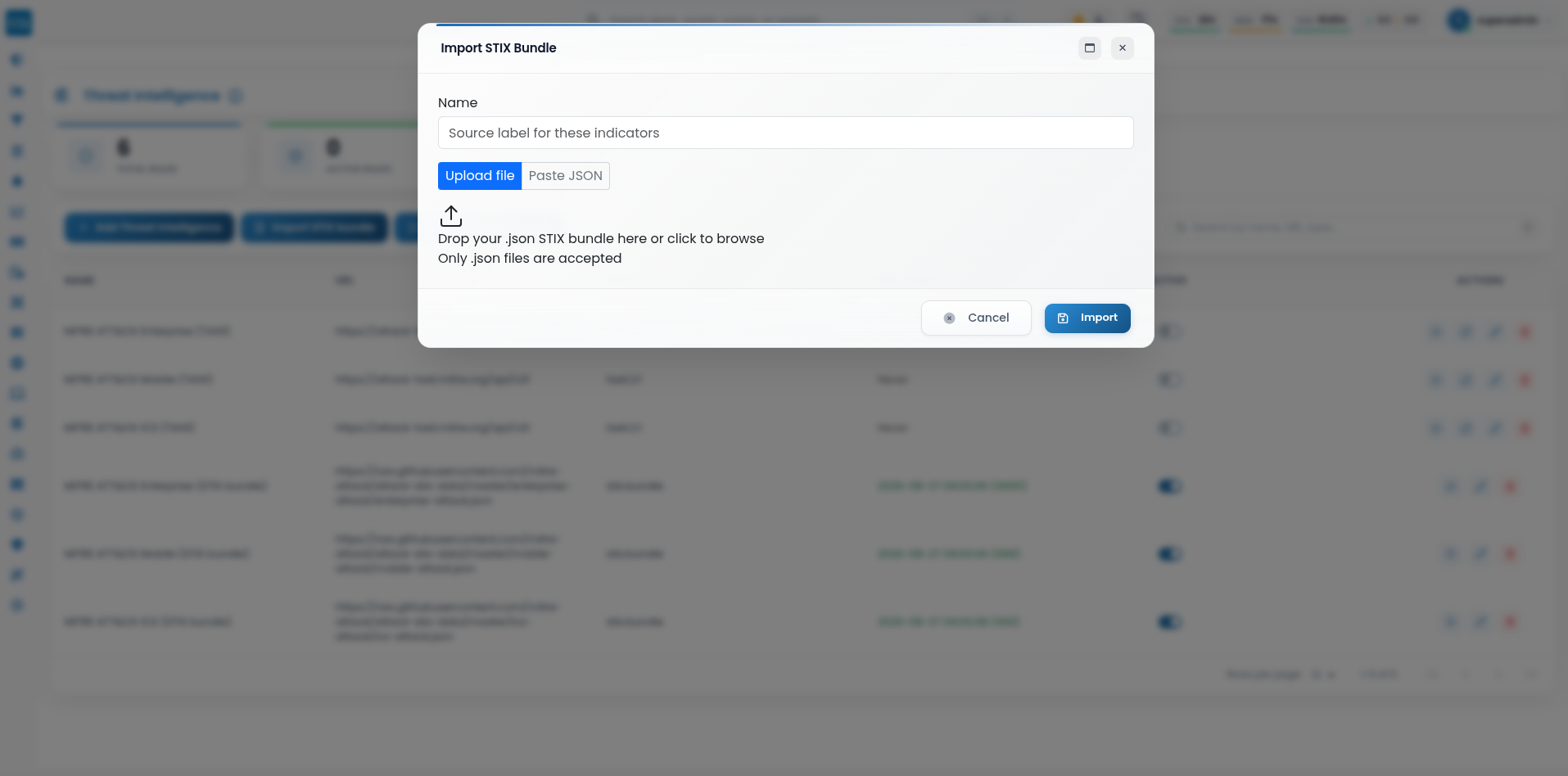
Imported STIX/TAXII content is processed by CYBERQUEST and made available through IOC Definitions, where the extracted definitions can be reviewed, searched, and inspected in detail: IOC Definitions
Managing Threat Intelligence Sources
After a threat intelligence source is created, administrators can manage it from the Threat Intelligence interface.
The interface displays the configured sources together with their Name, URL, Type, Last Sync status, activation state, and available management actions. The search field can be used to locate sources by name, URL, or type.
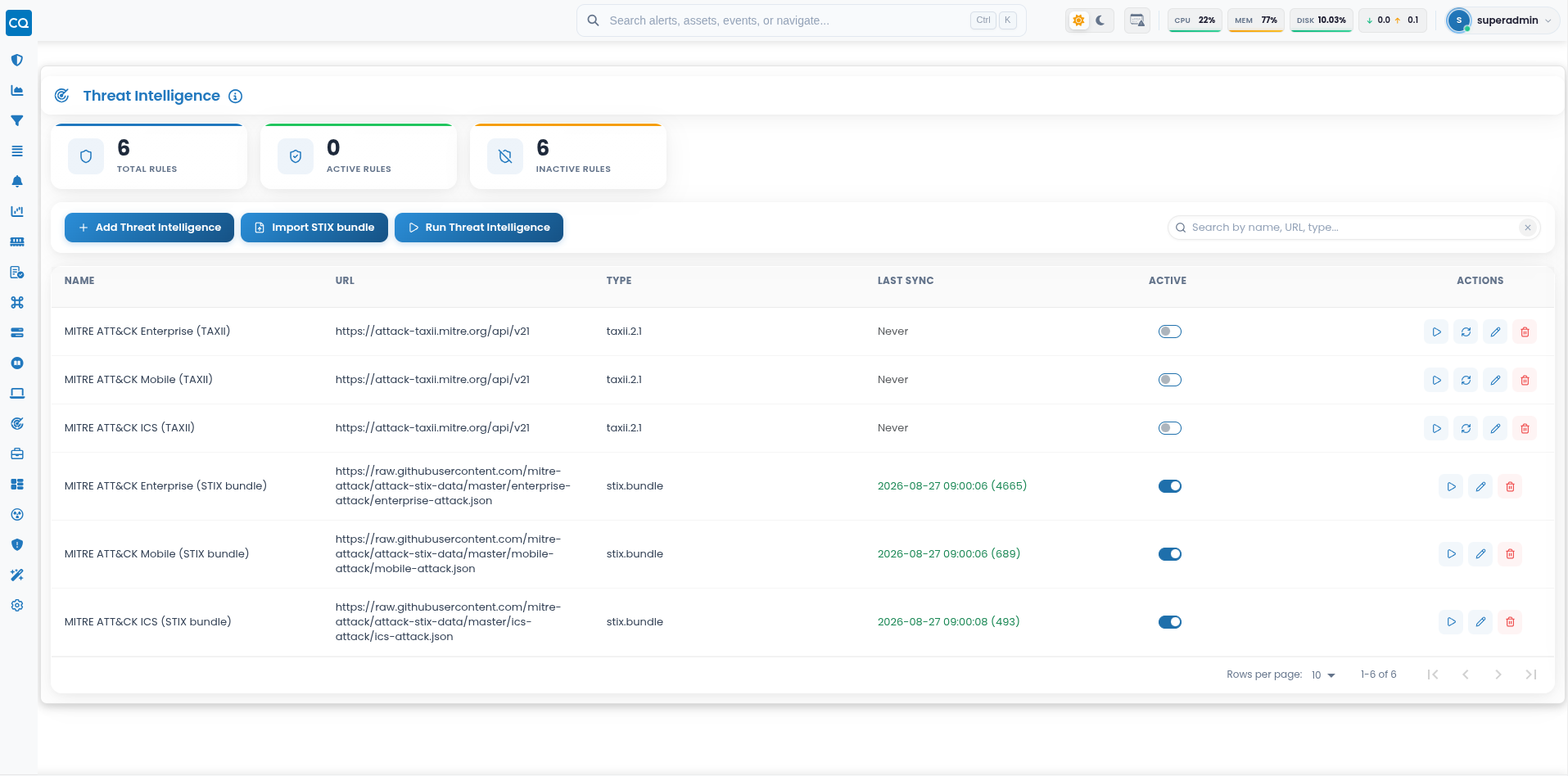
Available management actions may include:
- Sync now
 - Synchronizes the selected threat intelligence source and retrieves the latest available data.
 - Full re-sync (re-pull entire collection)
 - Re-pulls the complete dataset from the selected threat intelligence source and performs a full synchronization.
- Edit
 - Updates the configuration of an existing threat intelligence source.
 - Delete
 - Removes the selected threat intelligence source from the system.
 - Activate/Deactivate
 - Enables or disables the source without deleting it.
The Run Threat Intelligence  button at the top of the page can be used to manually start the threat intelligence processing workflow for the configured sources.
The Last Sync Information column shows when a source was last synchronized and, where available, the number of definitions retrieved during that synchronization.
These options allow administrators to maintain threat intelligence sources, synchronize and refresh threat data, disable unused feeds, and ensure that relevant threat intelligence remains available for detection, enrichment, and investigation workflows.