Documentation
Traffic Filters
Berkeley Packet Filters (BPF) are a powerful tool for creating Traffic Filters in intrusion detection analysis. By using BPF filters, large packet captures can be efficiently narrowed down to specific traffic types, making the analysis process more streamlined. Both administrative and non-administrative users are allowed to create BPF filters.
Access Traffic Filters
To access Traffic Filters, you have to go to Adminitration > Traffic Filters and the page will open:
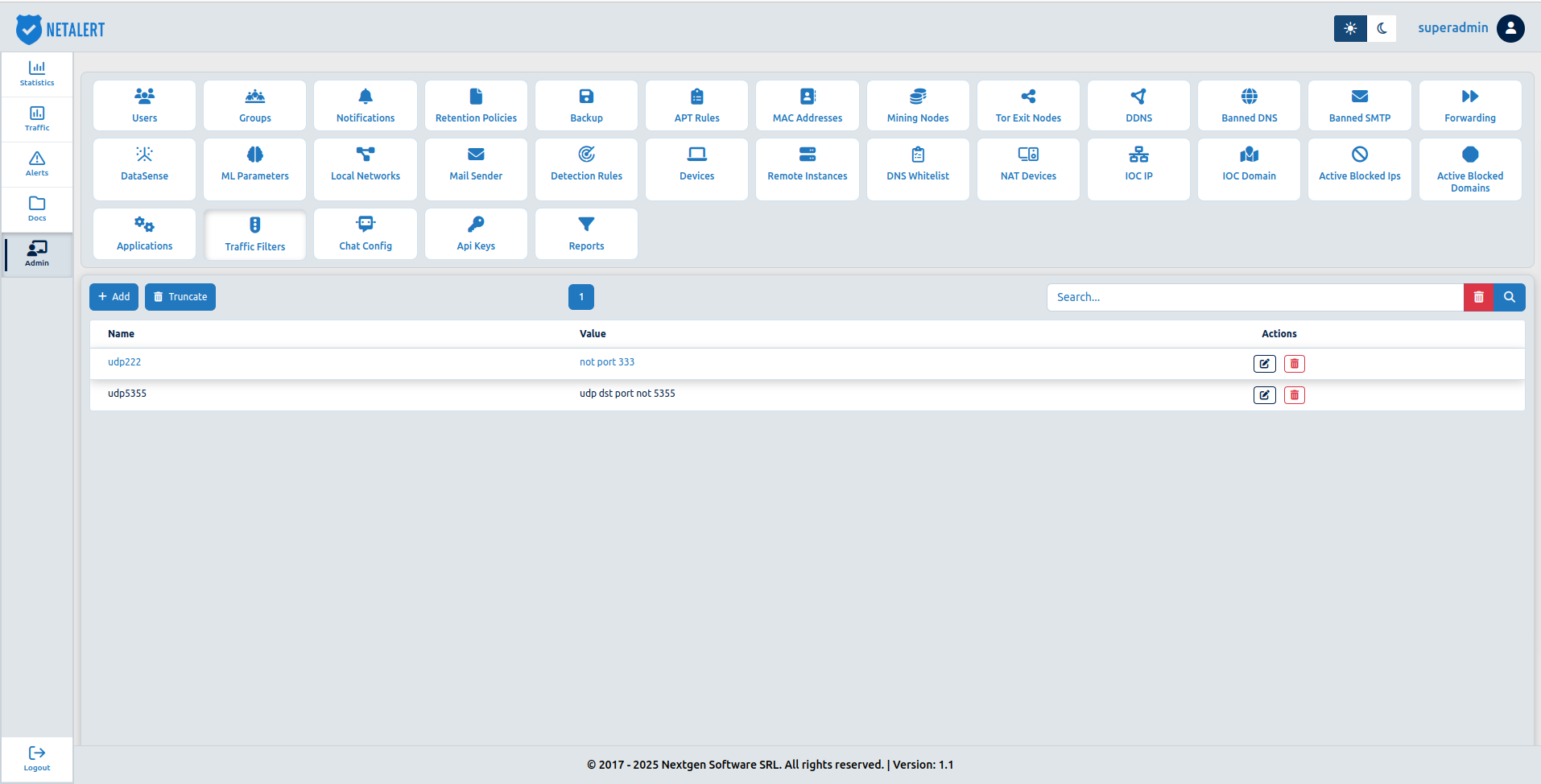
To add a Traffic Filter, you have to press the  button:
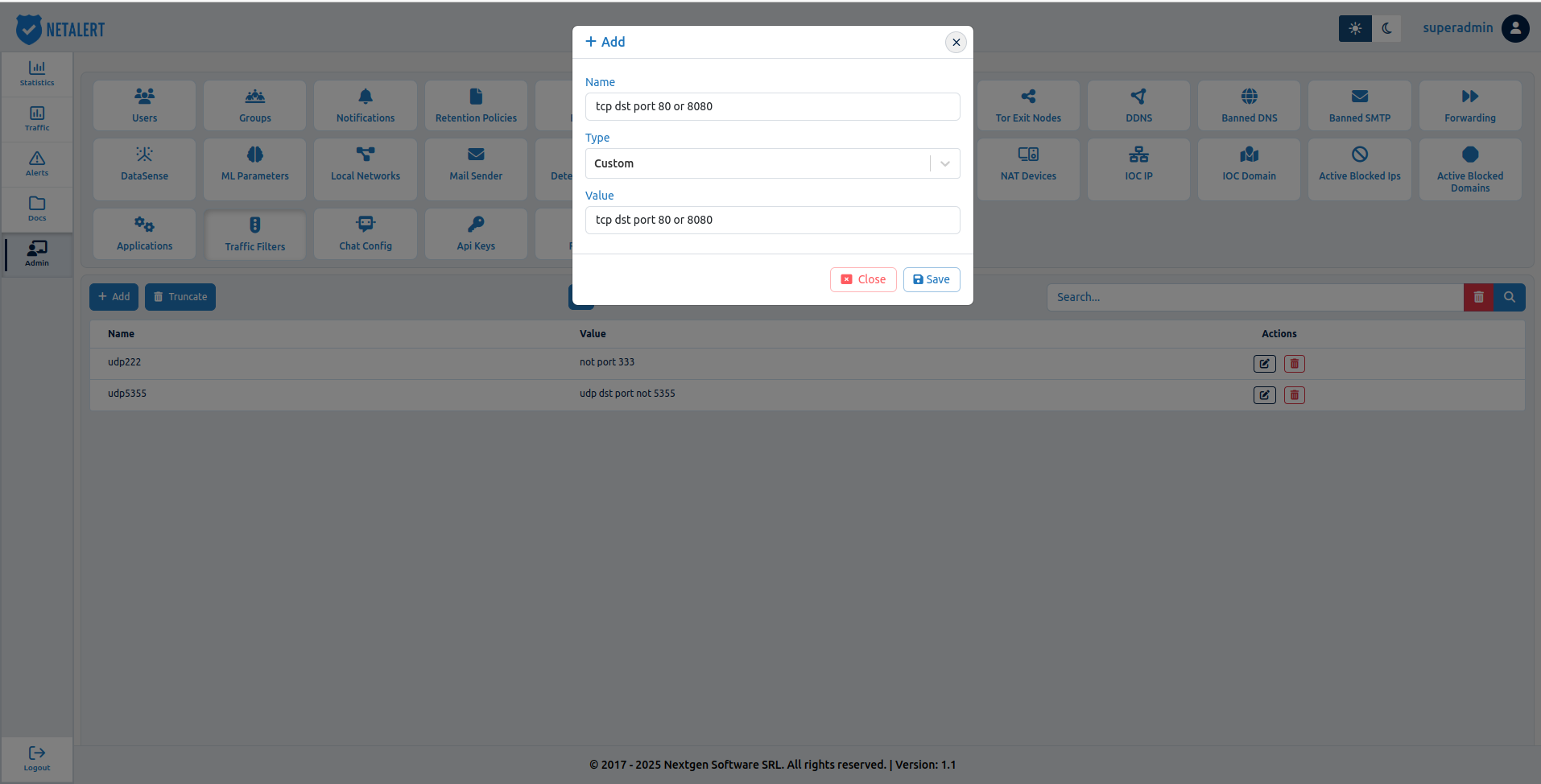
- In Name field - the name of the Traffic Filter must be provided.
- In Type field - default is custom type.
- In Value field - is used to input custom filter expressions.
Filter Elements
Filter Elements refer to fields in a network protocol header, such as host, port, or TCP port. In BPF syntax, a primitive typically consists of an identifier (ID), which is usually a name or number, preceded by one or more qualifiers.
Type Qualifiers
Type qualifiers specify the type of information the ID represents, such as host, net, port, or portrange. If no type qualifier is provided, it defaults to host.
Direction (Dir) Qualifiers
Direction qualifiers indicate the direction of traffic relative to the ID. Examples include src, dst, or src or dst.
Protocol (Proto) Qualifiers
Protocol qualifiers restrict the filter to a specific protocol, such as ether, fddi, tr, wlan, ip, ip6, arp, rarp, decnet, TCP, or UDP.
Table 1. Filter Elements
| Filter Elements | Description |
|---|---|
| `[src | dst] host |
| `ether [src | dst] host |
| `[src | dst] net |
| `[src | dst] net |
| `[src | dst] port |
| `[src | dst] portrange |
less <length> | Matches packets less than or equal to length, for example, len <= length. |
greater <length> | Matches packets greater than or equal to length, for example, len >= length. |
| `(ether | ip |
| `(ip | ip6) protochain |
| `(ether | ip) broadcast` |
| `(ether | ip |
vlan [<vlan>] | This filter matches 802.1Q frames that contain the specified VLAN ID. Examples: vlan 100 && vlan 200 filters on VLAN 200 encapsulated within VLAN 100, vlan && vlan 300 && ip filters IPv4 traffic encapsulated in VLAN 300, which is further encapsulated within any higher-level VLAN. |
mpls [<label>] | matches MPLS packets that contain a specific label. The MPLS expression can be applied multiple times to filter based on MPLS label hierarchies. Examples:mpls 100000 && mpls 1024 filters packets with outer label 100000 and inner label 1024.mpls && mpls 1024 && host 192.9.200.1 filters packets to and from 192.9.200.1 with an inner label of 1024 and any outer label. |
Protocols and Operators
Complex filter expressions can be created by combining protocols with primitive BPF filters using various modifiers and operators.
The following list outlines the available protocols that can be used:
arp- Address Resolution Protocol;ether- Ethernet;fddi- Fiber Distributed Data Interface;icmp- Internet Control Message Protocol;ip- IPv4;ip6- IPv6;link- Link Layer;ppp- Point-to-Point Protocol;radio- Radio Protocol (commonly used in wireless networking);rarp- Reverse Address Resolution Protocol;slip- Serial Line Internet Protocol;tcp- Transmission Control Protocol;tr- Token Ring;udp- User Datagram Protocol;wlan- Wireless Local Area Network.
Table 2. Valid modifiers and operators
| Description | Syntax | Example |
|---|---|---|
Parentheses ( ) - Used to group expressions, allowing you to control the order of evaluation | (expression) | `(src port 80 |
Negation != - Used to negate a condition, meaning “does not match” | field != value | src port != 80 (matches all source ports except port 80) |
Concatenation && or and - Represents a logical AND operation, used to combine multiple conditions. Both && and and can be used interchangeably | expression1 && expression2 or expression1 and expression2 | src port 80 && dst host 192.168.1.1 (matches packets where source port is 80 and destination host is 192.168.1.1) |
| **Alteration ` | oror** - Represents a logical OR operation, used to specify alternatives. Both |
BPF Filter Examples
The table below provides examples of BPF filters that incorporate operators and modifiers:
| BPF filter example | Description |
|---|---|
udp dst port not 53 | Captures UDP traffic that is not directed to port 53, which is commonly used for DNS queries. |
host 10.0 .0.1 && host 10.0 .0.2 | Captures traffic between the hosts with IP addresses 10.0.0.1 and 10.0.0.2. |
tcp dst port 80 or 8080 | Captures TCP packets directed to either port 80 (HTTP) or port 8080, often used for web traffic. |
ether[6:2] == 0x0800 | Captures Ethernet frames with the Ethertype 0x0800, identifying the frame as containing an IPv4 packet. |
ether[0:4] & 0xffffff0f > 25 | Applies a bitmask to the first 4 bytes of the Ethernet frame and captures packets where the result is greater than 25, allowing for range-based filtering. |
ip[1] != 0 | Captures IP packets where the Type of Service (TOS) field in the IP header is not equal to 0, indicating that the packet may have specific routing or priority requirements. |
ether host 11:22:33:44:55:66 | Captures Ethernet frames that are either sent to or received from the device with the MAC address 11:22:33:44:55:66. |
ether[0] & 1 = 0 and ip[16] >= 224 | Captures IP broadcast or multicast packets that are not sent through standard Ethernet broadcast or multicast addresses, based on specific bitmasking of the Ethernet frame and IP header. |
icmp[icmpcode] != 0 | Captures all ICMP packets, except for echo reply packets (with code 0), which are typically used in ping operations. |
icmp[icmptype] != icmp-echo | Captures all ICMP packets except for echo requests (ping), filtering out only the packets that are not used for network diagnostics. |
ip[0] & 0xf !=5 | Captures IP packets that include options in the IP header, excluding those with the standard header length of 5 words (which indicates no options). |
ip[9] == 1 && src net 192.168.1.0/24 | Captures ICMP packets from the 192.168.1.0/24 network. |
ip[6:2] & 0x1fff = 0 | Captures only unfragmented IPv4 packets and the first fragment of fragmented IPv4 packets, filtering out all other fragments. |
tcp[13] & 16 != 0 | Captures TCP packets with the ACK (Acknowledgment) flag set, typically used to acknowledge receipt of data in a TCP connection. |
tcp[13] & 32 !=0 | Captures TCP packets with the URG (Urgent) flag set, which signals that the packet contains urgent data that should be prioritized. |
tcp[13] & 8!=0 | Captures TCP packets with the PSH (Push) flag set, indicating that the sender wants the receiver to pass the data to the application layer immediately. |
tcp[13] & 4!=0 | Captures TCP packets with the RST (Reset) flag set, used to reset a TCP connection. |
TCP[13] & 2!=0 | Captures TCP packets with the SYN (Synchronize) flag set, typically used to initiate a new TCP connection. |
tcp[13] & 1!=0 | Captures TCP packets with the FIN (Finish) flag set, indicating the termination of a TCP connection. |
| `tcp[tcpflags] & (tcp-syn | tcp-fin) != 0` |