Documentation
ML Models
ML Models
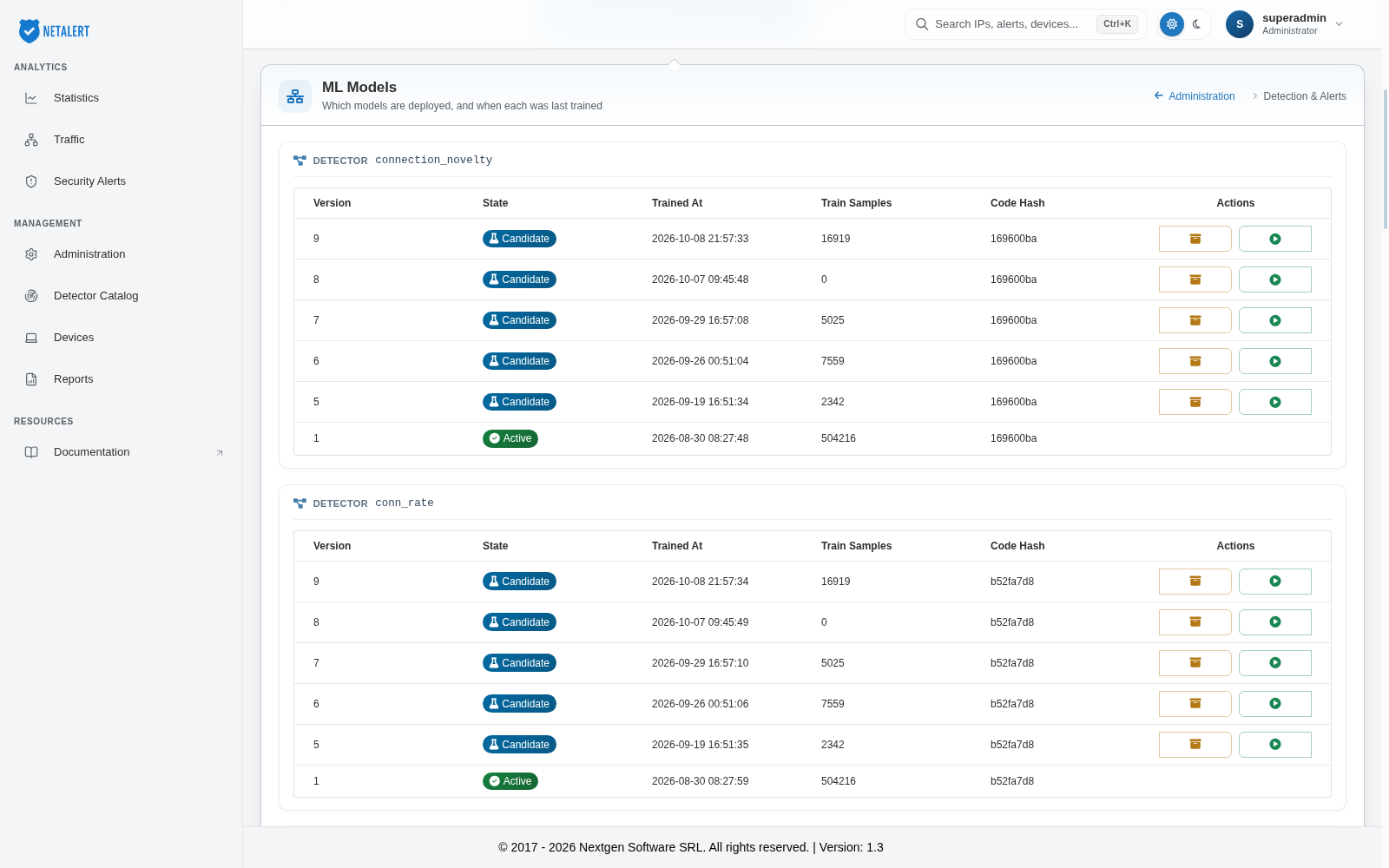
The machine-learning detectors do not use a single fixed model. They learn what is normal from observed traffic, and are retrained periodically as that traffic changes. The ML Models page is the registry of those trained models: which detectors have a model, which version is in use, when it was trained and on how much data.
Navigate to Administration > Detection & Alerts > ML Models.
Reading the registry
Models are grouped by detector, each labelled with the detector’s internal name (for example
connection_novelty). Each detector has its own table of versions:
| Version | Version number of the model. A new version is produced each time the detector is retrained |
| State | The version’s lifecycle state (see below) |
| Trained At | When the model was produced |
| Train Samples | How many observations the model was trained on |
| Code Hash | Identifies the version of the training code that produced the model (first eight characters) |
| Actions | Archive (box icon) and Activate (play icon), where they apply to the version |
Model states
| Candidate | A newly trained version that is not yet in use. Retraining produces candidates; it does not replace the active model on its own |
| Shadow | A version held in reserve; like a candidate, it is not the version the detector uses |
| Active | The version the detector currently uses. Each detector has one |
| Archived | A version set aside and retained for reference |
| Failed | A training attempt that did not produce a usable model |
Activating or archiving a version
Click Activate this version (play icon) on any version that is not active to make it the one the detector uses. Click Archive this version (box icon) on a candidate, shadow or failed version to set it aside. Both actions ask you to confirm first. The active version has no actions; to replace it, activate another version.
Before activating a candidate, check its Train Samples: a candidate trained on very few observations (or none) should not replace an active model trained on far more data.
Why several models per detector
Some detectors build a model per monitored entity rather than one model for the whole network. A device-baseline detector, for example, learns the habits of each device separately - what it normally talks to, how much and when - because “normal” for a backup server and normal for a workstation have nothing in common. Those detectors therefore appear in this registry many times over, once per entity, each with its own training history.
What to look for
Train Samples is the figure worth checking. A model trained on very few observations has not seen enough of the network to have a reliable idea of what normal looks like, and will tend either to flag ordinary behaviour or to miss genuine anomalies. Newly added devices are the common cause: the detector has begun learning but does not yet have enough history.
Trained At shows whether models are being refreshed. If timestamps stop advancing across all detectors, retraining is no longer completing - the ML Health page reports the outcome of the most recent training attempt and is the place to confirm that.
Code Hash matters after an upgrade: models produced by different training code are not directly comparable, so a change of hash explains a change in behaviour that is not caused by the traffic itself.
You set the thresholds and training parameters that govern how these models are built on the ML Parameters page.