Documentation
APT Rules
APT Rules
APT rules
The APT (Advanced Persistent Threat) Rules functionality in NETALERT enables you to customize detection parameters for sophisticated, long-term threats. By modifying APT rules, the solution can better identify stealthy intrusions and targeted attacks that evolve over extended periods. These rules often incorporate multiple indicators-such as anomalous behaviors, suspicious connections, and advanced malware signatures-to provide an in-depth defense strategy.
To access the APT Rules interface, navigate to Administration > Detection & Alerts > APT Rules in the Web Interface:

The list shows each rule’s Name, Threshold and Score. NETALERT ships with a set of predefined campaign rules, named after the threat actor or campaign they model (for example Volt Typhoon - LOTL Intrusion or APT29 (Cozy Bear) - Stealth C2 & Exfil). Each one combines several alert signals that are correlated on the same IP address, and all of them are active by default. They can be edited, deactivated or deleted like any rule you create.
The APT Rules interface offers the following actions:
- Add Apt Rule – Creates a new rule entry where detection parameters, thresholds, and tests can be defined.
- Edit – Modifies the parameters, thresholds, or tests of an existing APT rule.
- Active switch – Activates or deactivates an APT rule, enabling or disabling it in the detection system without deleting it.
- Delete – Removes an existing APT rule from the system, permanently eliminating its configuration and associated tests.
- Import CSV – Uploads a file containing predefined APT rules. This action is not available while you are managing a remote instance.
- Export CSV – Saves current APT rules to a CSV file.
- APT Settings – Replaces the rule list with the APT settings screen. Select Back to APT Rules to return to the list.
How to create APT rules
To define a new APT Rule, press the Add APT Rule button in the APT Rules interface. The following fields must be specified:
Name – A unique identifier for the APT Rule.
Threshold % – The value at which an alert is triggered if the rule’s conditions are met or exceeded.
ML Score - A Machine Learning-based score that assesses the likelihood of a detected activity being malicious. Higher values indicate greater suspicion.
Severity - A number that represents the criticality of the detected activity, helping prioritize alerts based on their potential threat level.
Impact - Categorizes the potential consequences of a detected threat using predefined levels (LOW, MEDIUM, HIGH, CRITICAL). A higher impact level indicates a greater risk to systems, data, or operations.
Add test: Select Add test, choose a test from the list, and select the add button next to it. Repeat for each test the rule needs. After adding these tests, each can be configured individually to adjust detection parameters, and removed with its delete button.
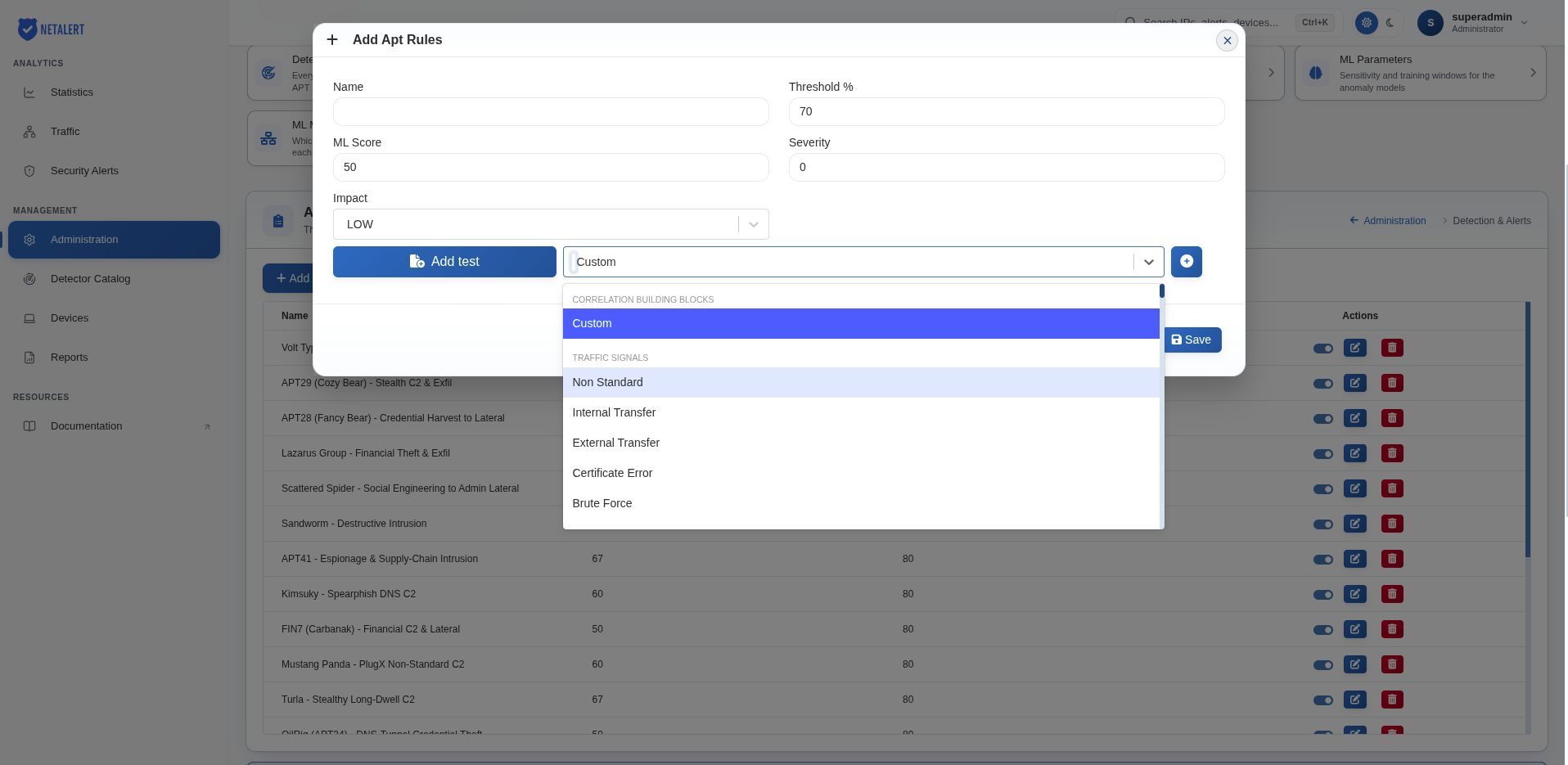
Each test has the following parameters:
| Parameter | Description |
|---|---|
| Attack Stage | The ATT&CK stage the test represents, for example CredentialAccess or LateralMovement |
| Mitre ID | The ATT&CK technique the test represents |
| Time Interval | The unit of the interval value (seconds) |
| Interval Type | StartCorrelation makes the test look back Interval Value seconds from the time the rule is evaluated; previousEvent makes it reuse the start of the previous test’s time window |
| Interval Value | How far back the test looks, in seconds, when the interval type is StartCorrelation. The default is 86400 (one day) |
| Correlation Field | The field used to link this test’s events to the others: SrcIP or DestIP for traffic, Alert_IP for alerts. Not shown for alert-based tests (Alert signals and Legacy alert hints) |
| Test Threshold | The number of matching events needed for the test to be validated. The default is 20 |
| Weight | The weight of the test in the rule’s weighted mean, from 1 to 100. The default is 25 |
| Custom Query | Custom tests only. The query that selects the events, which you can also build from the filters list next to it |
| Type | Custom tests only. Whether the custom query runs against Traffic or Alert data |
The test list is divided into four groups:
- Correlation building blocks – Custom, a test defined by your own query.
- Traffic signals – Facts recorded for each flow, such as a non-standard port or an internal transfer.
- Alert signals – One entry for every alert type NETALERT can raise. A test of this kind is validated by alerts of that type, matched by the alert type’s identifier, so it keeps working if an alert is renamed. This is the group to use for new rules.
- Legacy alert hints (superseded) – Older tests that match alerts by name. They are kept so that existing rules continue to work; each has an equivalent under Alert signals.
The table below summarises the tests in the Correlation building blocks, Traffic signals and Legacy alert hints groups:
| Test Name | Description |
|---|---|
| Custom | Allows you to define user-specific conditions or thresholds not covered by the predefined tests |
| Non Standard | Detects traffic occurring on ports or protocols that deviate from typical standards (e.g., HTTPS on port 8080) |
| Internal Transfer | Identifies file transfers or data exchanges within the internal network, potentially highlighting lateral movement |
| External Transfer | Flags file transfers or data exchanges from internal to external hosts, useful for detecting potential exfiltration |
| Certificate Error | Monitors SSL/TLS connections for invalid or mismatched certificates, indicating possible misconfiguration or malicious interception |
| Brute Force | Detects repeated login attempts from the same source, indicating a potential brute-force attack |
| TOR | Identifies traffic to or from known TOR exit nodes, suggesting anonymized or potentially malicious communication |
| Internal To External Communication | Flags communications originating from inside the network and directed toward external hosts, highlighting unusual outbound connections |
| ProxyTraffic | Detects traffic routed through proxy servers, useful for identifying hidden or redirected connections |
| DNS Request Error Server Failure | Alerts on DNS queries resulting in server failures, indicating possible misconfiguration or suspicious DNS activity |
| Dynamic DNS Request | Monitors DNS queries to dynamic DNS services, which can be used by attackers to mask malicious infrastructure |
| Kerberos | Tracks unusual Kerberos-related traffic, potentially revealing authentication anomalies or lateral movement attempts |
| SMTP | Observes SMTP-based communications for suspicious behavior, including as spam or unauthorized email usage |
| Connections On Known Protocols In Non Standard Ports | Detects protocols (e.g., HTTP, FTP) running on unexpected ports, possibly indicating evasion of standard security controls |
| Alert Address Scan By IP | Identifies scanning attempts targeting multiple IP addresses, often a sign of reconnaissance or vulnerability probing |
| Alert Port Scan By IP | Detects port scanning behavior from a specific IP, signaling an attempt to find open services on a target |
| Alert Heart Bleed | Monitors for Heartbleed vulnerability indicators in SSL/TLS traffic, helping to prevent data leaks |
| Alert IOC IP | Flags communication with IP addresses listed as Indicators of Compromise, suggesting malicious or high-risk connections |
| Alert DNS Timeout | Alerts on DNS requests that time out, which may indicate misconfigurations or deliberate attempts to evade detection |
| Alert Anomalous Connections | Identifies connections exhibiting unusual patterns, volumes, or frequencies, hinting at potential intrusions |
| Alert Invalid SSL | Detects SSL certificates that fail validation checks, often pointing to compromised certificates or MITM attacks |
| Alert Brute Force | Recognizes repeated login failures or authentication attempts from the same source IP, highlighting brute-force activity |
| Alert Communication Over Non Standard Port | Spots network traffic using ports not typically associated with the given protocol, potentially bypassing standard security measures |
| Alert IOC Domains | Flags domain names identified as malicious or suspicious in threat intelligence feeds, indicating possible compromise |
Examples of APT rules
Example 1 – Custom DDOS
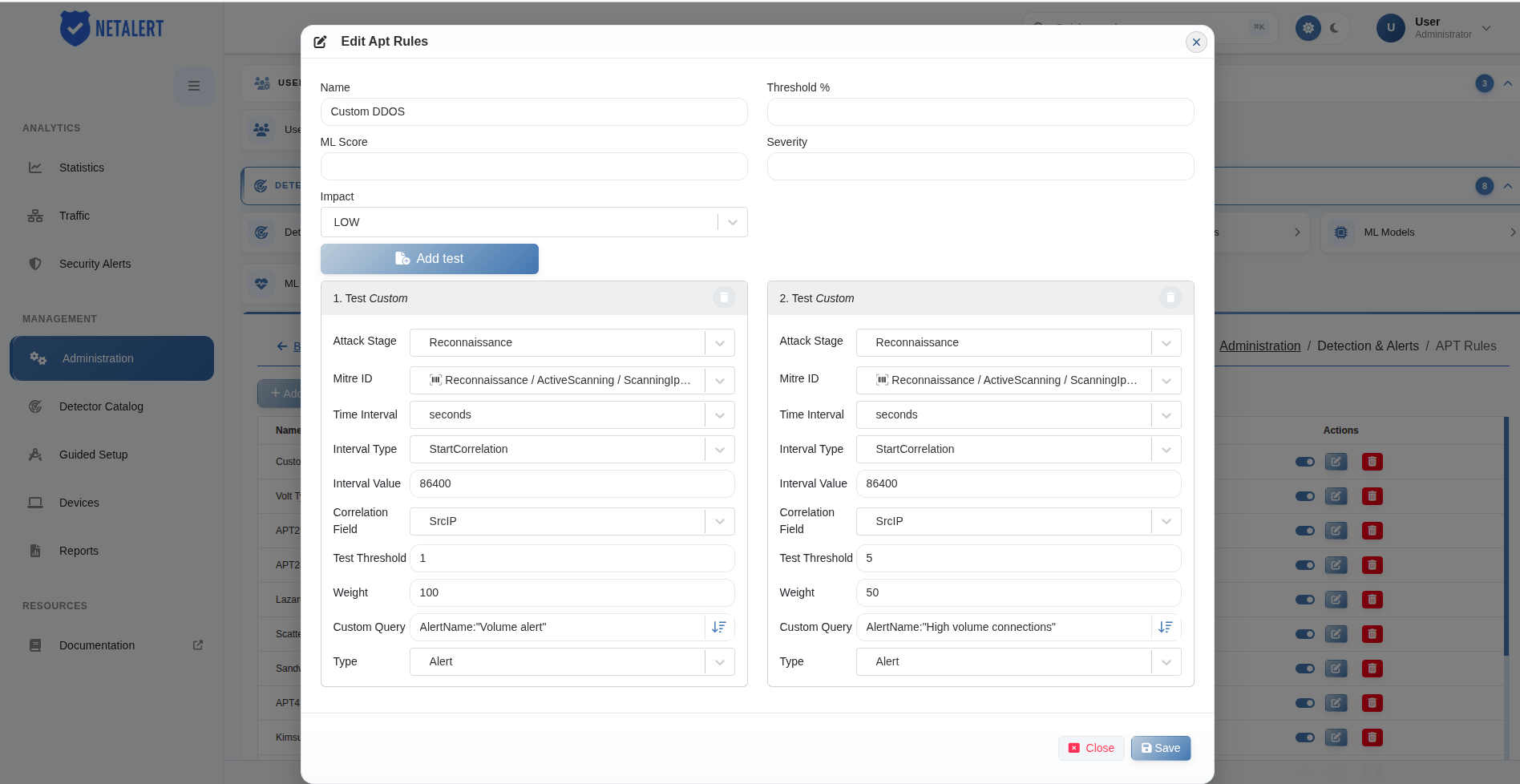
This example demonstrates an APT rule named Custom DDOS, which correlates two custom alert tests to identify potential DDoS-related activity originating from the same source IP address.
The rule contains two tests with different weights and thresholds:
- Test 1 – Custom (Volume alert) – This test is validated when at least one alert matching the Custom Query
AlertName:"Volume alert"is detected within a 24-hour period. The Test Threshold is set to 1, and the Weight is 100. - Test 2 – Custom (High volume connections) – This test is validated when at least five alerts matching the Custom Query
AlertName:"High volume connections"are detected within a 24-hour period. The Test Threshold is set to 5, and the Weight is 50.
Both tests use the following configuration:
- Attack Stage: Reconnaissance
- MITRE ID: T1595.001 – Scanning IP Blocks
- Time Interval: seconds
- Interval Type: StartCorrelation
- Interval Value: 86400 (24 hours)
- Correlation Field: SrcIP
- Type: Alert
The SrcIP correlation field ensures that the tests are evaluated based on alerts associated with the same source IP address.
The APT rule evaluates the validated tests using their configured weights and calculates a weighted arithmetic mean (weighted_arithmetic_mean). This result is used to determine whether the conditions required to generate an APT alert have been satisfied.
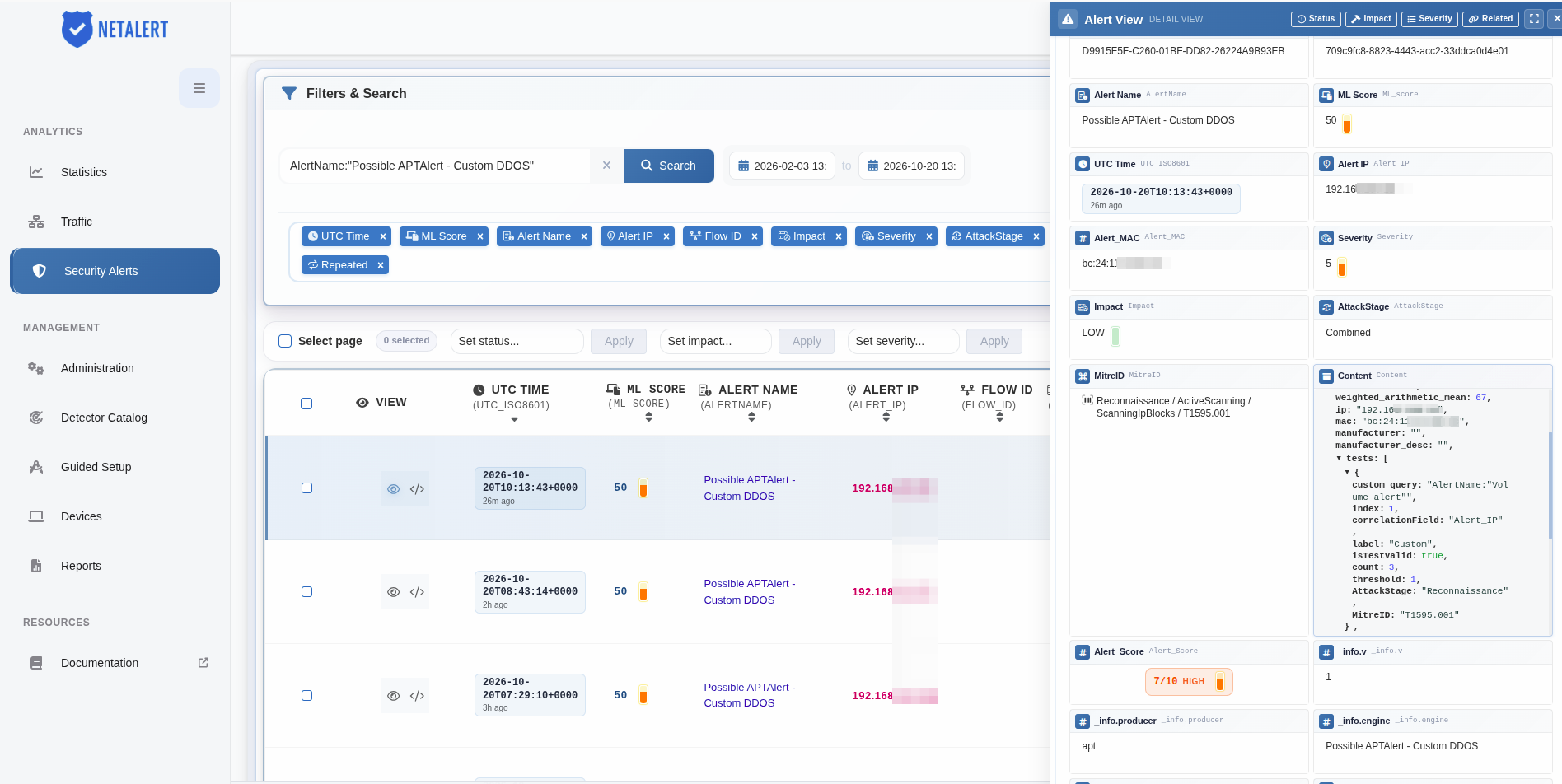
When the rule’s configured threshold is met, NETALERT generates an alert named Possible APTAlert - Custom DDOS, with the attack stage set to Combined.
The generated alert includes information about the contributing tests, their validation status, correlation details, and calculated score, supporting further investigation of potentially malicious network activity.
Example 2 - Data exfiltration via unusual external transfer
In this example, three separate tests contribute to an APT alert:
Test Internal Transfer - Monitors large internal data transfers
Test External Transfer - Flags unusual outbound data flows
Test Internal To External Communication - Detects unusual outbound connections that could indicate data exfiltration
A potential data breach is detected when large amounts of data are transferred internally (Internal Transfer) before being sent outside the network (External Transfer). If unusual outbound connections are detected (Internal To External Communication), it could indicate an attempt to exfiltrate sensitive information.
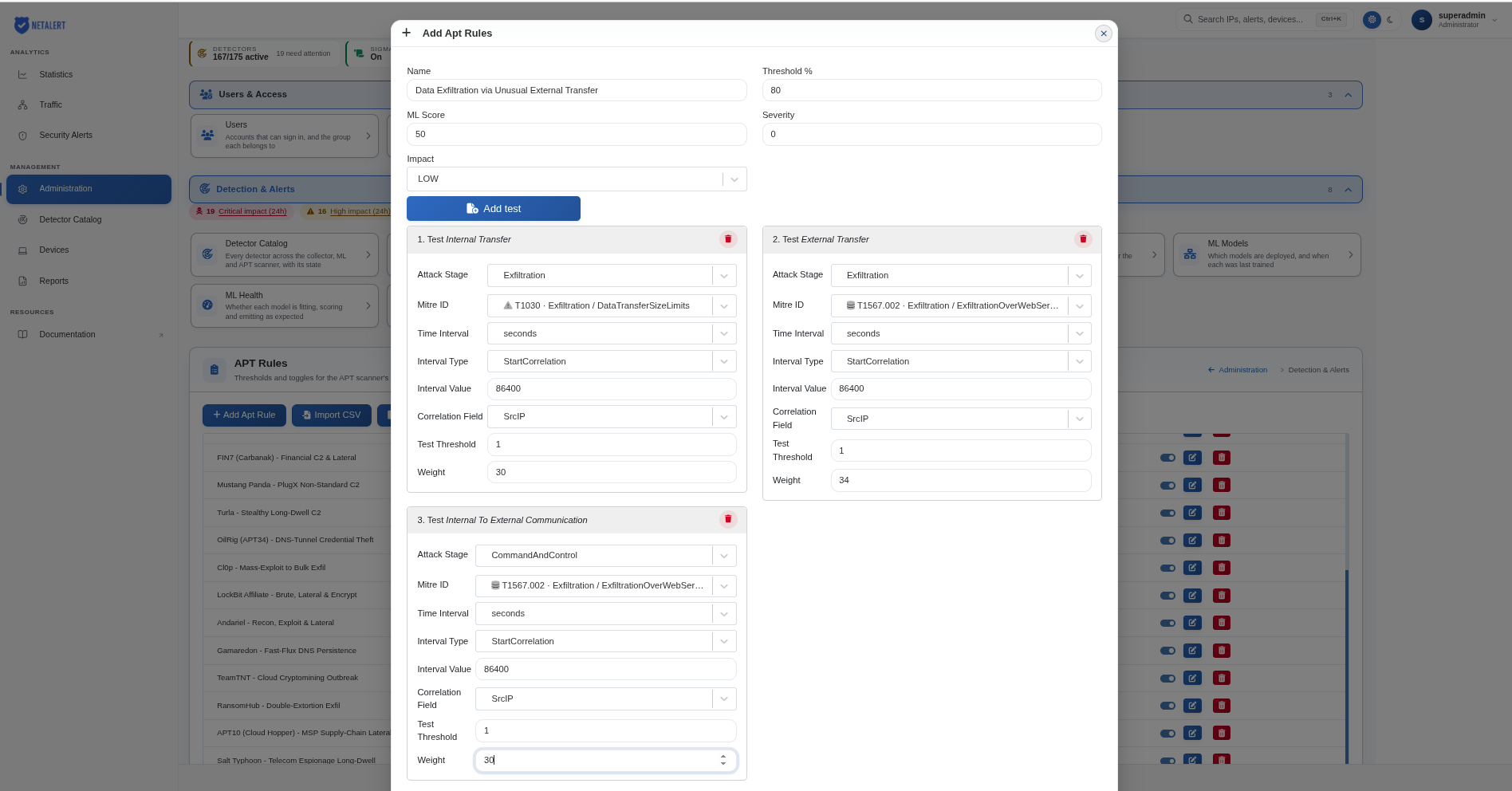
Once all three tests are validated, a weighted arithmetic mean is calculated using the values specified in the Weight field of each test. The final result (weighted_arithmetic_mean) is then compared to the defined Threshold.
If the threshold exceeds 80%, an APT alert is triggered.
Example 3 - Suspicious_Network_Reconnaissance_Activity
In this example, three separate tests contribute to an APT alert:
- Test Alert IOC IP - Checks for communication with known malicious IPs
- Test Alert Port Scan By IP - Detects unusual port scanning behavior
- Test Alert DNS Timeout - Flags repeated failed DNS queries, potentially signaling reconnaissance attempts
A threat actor is attempting to scan the network for open ports and vulnerabilities. If a system within the organization communicates with a known malicious IP (Alert IOC IP) and simultaneously performs excessive port scanning (Alert Port Scan By IP), it may indicate reconnaissance. Additionally, repeated DNS query failures (Alert DNS Timeout) suggest attempts to resolve domains that no longer exist, possibly linked to abandoned malware infrastructure.
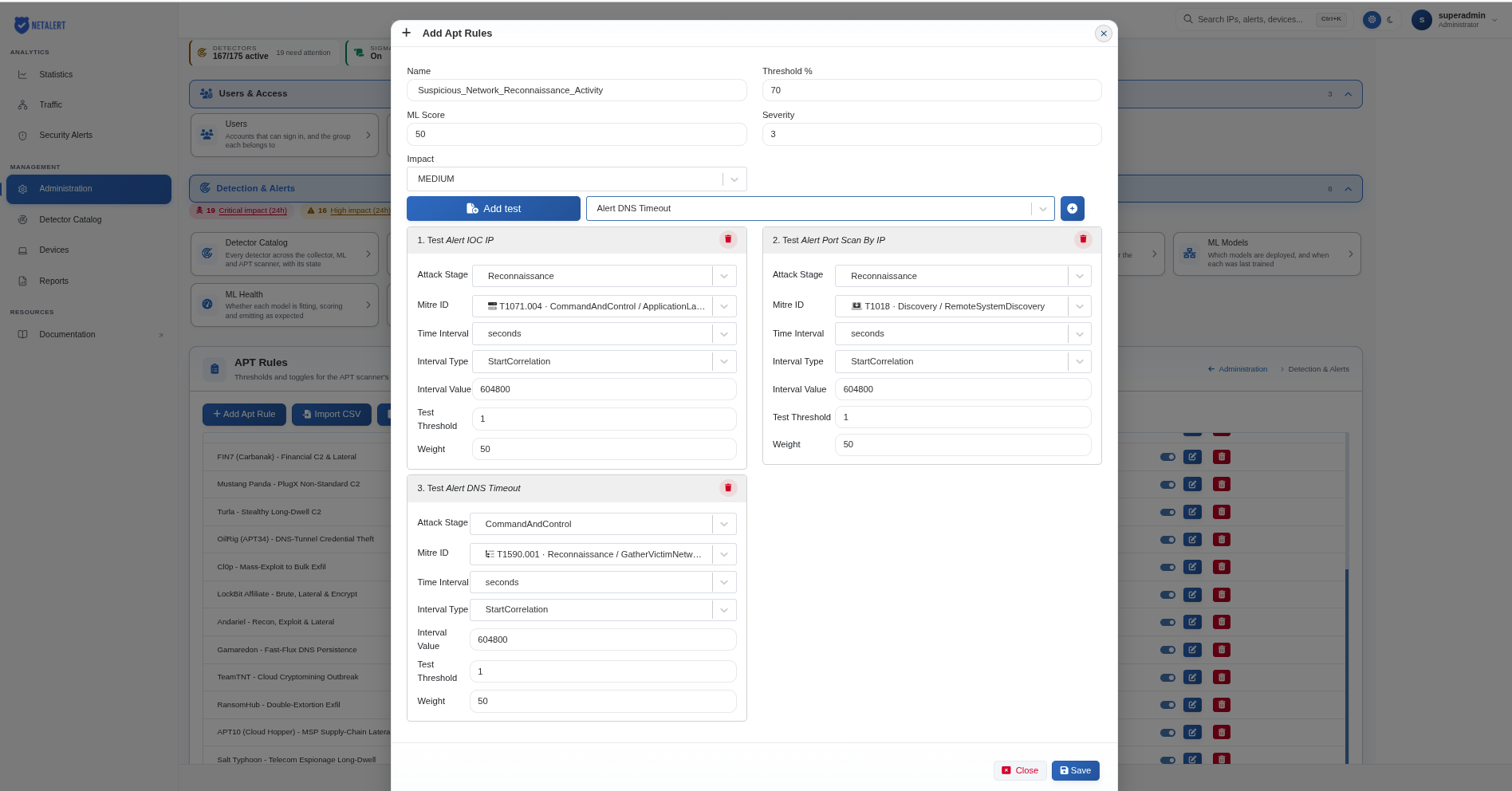
Once all three tests are validated, a weighted arithmetic mean is calculated using the values specified in the Weight field of each test. The final result (weighted_arithmetic_mean) is then compared to the defined Threshold.
If the threshold exceeds 70%, an APT alert is triggered.
Example 4 - Brute_Force_Attack_on_Authentication_Services
In this example, three separate tests contribute to an APT alert:
- Test Alert Brute Force - Detects repeated login attempts from the same source
- Test Kerberos - Monitors authentication requests for suspicious activity
- Test Alert Invalid SSL - Flags incorrect SSL/TLS certificate usage
An attacker is attempting unauthorized access by repeatedly guessing credentials (Alert Brute Force). If the authentication mechanism (Kerberos) detects a spike in failed login attempts and improper SSL/TLS certificates are used (Alert Invalid SSL), it may indicate an attacker testing login credentials or attempting to intercept encrypted traffic.
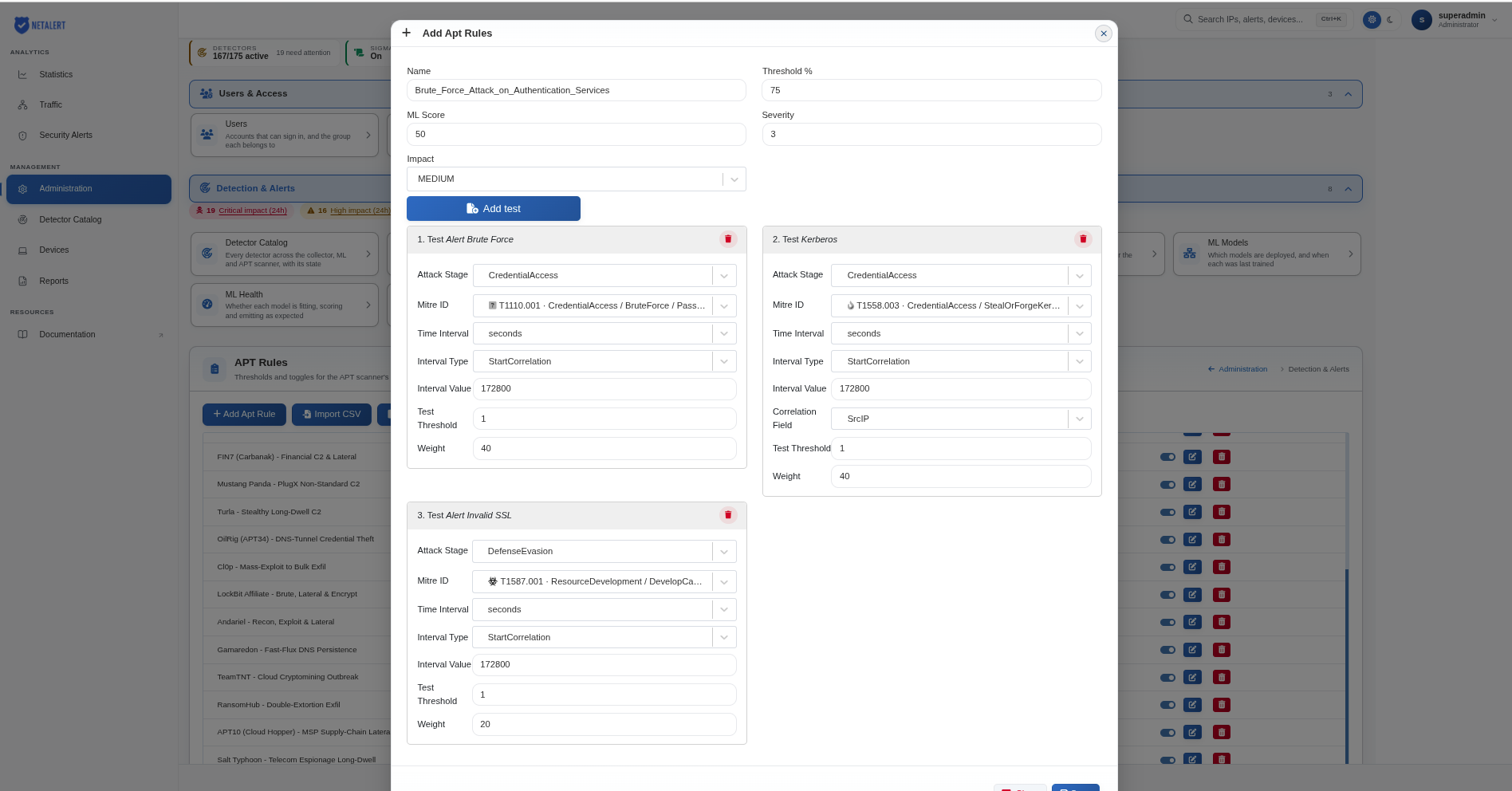
Once all three tests are validated, a weighted arithmetic mean is calculated using the values specified in the Weight field of each test. The final result (weighted_arithmetic_mean) is then compared to the defined Threshold.
If the threshold exceeds 75%, an APT alert is triggered.
Example 5 - Malicious_Traffic_from_TOR_Nodes
In this example, three separate tests contribute to an APT alert:
Test Historical Tor Exit Node - Detects connections originating from TOR network
Test Alert Communication Over Non Standard Port - Flags traffic on unexpected ports
Test Alert Anomalous Connections - Identifies connections that deviate from normal behavior
An attacker is using TOR exit nodes to obfuscate their identity and access internal resources. If traffic is seen coming from known TOR exit nodes, using non-standard ports to communicate with internal assets, and establishing unusual connections, this could indicate malicious activity.
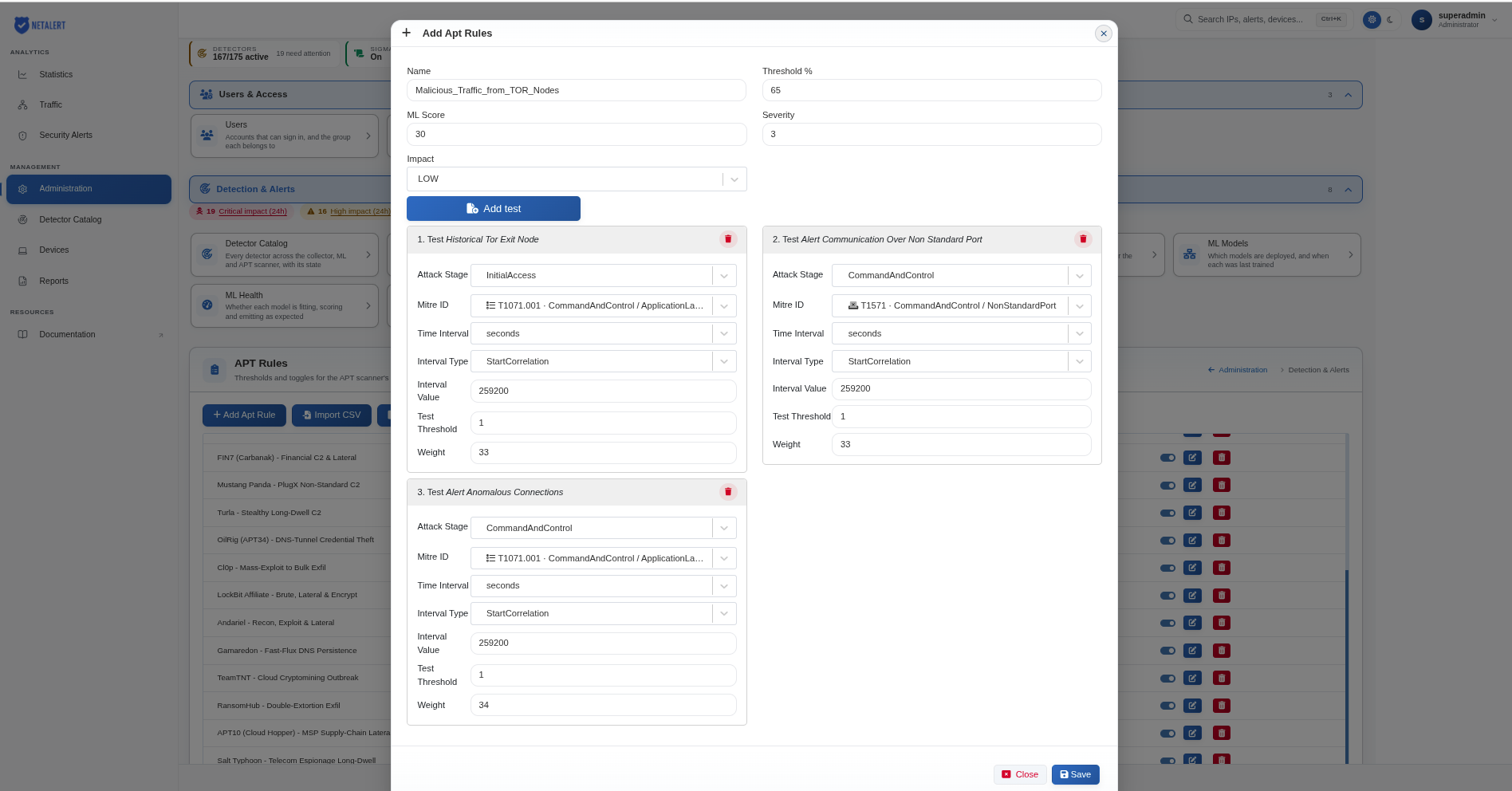
Once all three tests are validated, a weighted arithmetic mean is calculated using the values specified in the Weight field of each test. The final result (weighted_arithmetic_mean) is then compared to the defined Threshold.
If the threshold exceeds 65%, an APT alert is triggered.
Example 6 - Phishing_Attack_with_Malicious_Domains
In this example, three separate tests contribute to an APT alert:
- Test Alert IOC Domains - Flags access to known malicious domains
- Test Dynamic DNS Request - Monitors domain generation algorithm-based activity
- Test SMTP - Detects suspicious email behavior
An attacker is using phishing emails to trick employees into clicking on malicious links. If an email is sent from an SMTP server that exhibits unusual behavior, and the recipient’s device accesses a known malicious domain (Alert IOC Domains) or a dynamically generated domain (Dynamic DNS Request), this suggests a phishing attempt leading to malware infection.
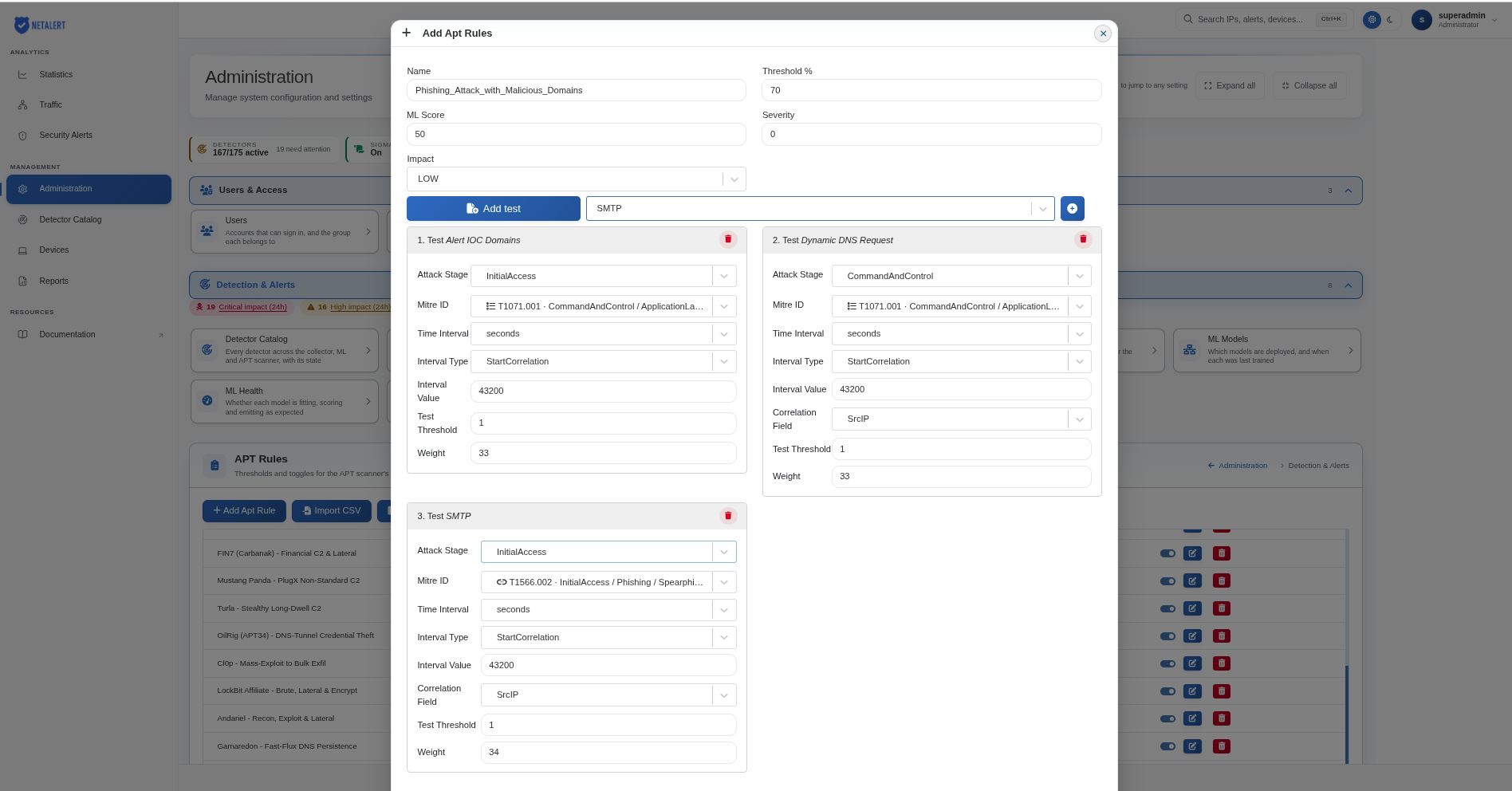
Once all three tests are validated, a weighted arithmetic mean is calculated using the values specified in the Weight field of each test. The final result (weighted_arithmetic_mean) is then compared to the defined Threshold.
If the threshold exceeds 70%, an APT alert is triggered.
APT settings
The APT Settings screen controls the APT scanner’s built-in detections. It is reached from the APT Settings button on the APT Rules page, and Back to APT Rules returns to the rule list.
APT detection has three layers: the custom APT rules described above, the enhancement detections, and the legacy scanner thresholds. The screen covers the last two.

Enhancement detections
Enhancement detections are built-in policy, correlation, campaign and detection-health scenarios that complement the collector and ML detections. The header shows how many scenarios there are and how many are active or disabled.
Each active detector writes alerts only once its minimum data coverage is met; below that it stays silent rather than firing on partial data. Policy detectors also stay silent until their lists are configured, for example the approved DNS resolvers or the protected assets.
The scenario list shows each scenario’s Rank, its name and capability ID, its ATT&CK techniques, its Readiness (what it needs before it can fire, such as Now, Policy or Upstream) and its Mode. The following controls are available:
- Search – Find scenarios by name, capability ID or ATT&CK technique.
- Status and Readiness – Filter the list by mode and by readiness.
- Enable visible / Disable visible - switch on or off every scenario currently shown by the filters, rather than one at a time. Because these act on the filtered list rather than the whole catalogue, check what the filters are showing before using them.
- Mode – Set a single scenario to Active or Disabled.
- Configure (the arrow at the end of a row) – Show the scenario’s description, capability ID, alert UUID, ATT&CK stage and techniques, and its settings: the Minimum data coverage slider and any lists the scenario uses, entered one value per line. A list marked Required policy must be filled in before the scenario can fire; one marked Optional tuning refines it.
- Advanced JSON – Edit the full configuration as JSON, for threshold fields that are not yet shown in the list. It is validated by the same rules as the scanner itself.
- Reset - discard the changes you have not saved and return to the last saved configuration.
- Save detection settings - apply the changes. Nothing takes effect until this is used. The bar next to the buttons shows whether there are unsaved changes.
Enhancement detection lists and thresholds
Each scenario reads its settings from named lists and thresholds. The lists a scenario uses most
often appear in its Configure panel; any other list or threshold can be set through
Advanced JSON, either for a single scenario under detectors.<capability ID> or for every
scenario at once under shared. A value set for a scenario overrides the shared value, which
overrides the built-in default. A list that you set replaces the built-in default list rather
than adding to it, so include the default entries you want to keep. Changes are read by the APT
scanner at the start of its next pass.
{
  "version": 1,
  "shared": {
    "lists": { "domain_controllers": ["10.0.0.10", "10.0.0.11"] }
  },
  "detectors": {
    "WINRM_EXEC_TO_DC": {
      "enabled": true,
      "minimum_coverage": 0.9,
      "lists": { "approved_admin_sources": ["10.0.5.20"] },
      "thresholds": {}
    }
  }
}
Required lists. The following scenarios stay silent until their list is filled in. Setting
domain_controllers once under shared covers all the domain-controller scenarios.
| List | Scenarios (rank) |
|---|---|
domain_controllers | DCSync-Style Replication Volume (64), Netlogon Authentication Burst to Domain Controller (69), WinRM Execution to Domain Controller (70), DCSync Replication via RPC Pipe (72), SAMR Domain Account Enumeration (77), LDAP Directory Enumeration (85) |
domain_controllers or protected_assets | Coerced Authentication Callback (90). Either list is enough. |
protected_assets | First Seen Country for Asset (34) |
approved_services | Unapproved Inbound Service (2) |
approved_resolvers | DNS Resolver Policy Bypass (3) |
approved_sources | Unauthorized SMTP Client (4) |
approved_servers | Unauthorized DHCP Server (5) |
disallowed_countries | Disallowed Country Egress (7) |
asset_roles and prohibited_matrix | Peer Group Policy Violation (23) |
service_inventory | Rogue Internal Service Adoption (24) |
minimum_tls_version | Deprecated TLS Version Policy (28) |
expected_datasources | Datasource Silence (36) |
required_fields | Detection Field Coverage Regression (38) |
parity_rules | Upstream Detector Parity Failure (39) |
Allowlists. These are empty by default. An address in one of them is not reported by the scenarios that use it.
| List | Exempts | Used by |
|---|---|---|
approved_admin_sources | Sanctioned administration hosts | WinRM Execution to Domain Controller, WMI Remote Execution, RPC Endpoint Mapper Enumeration, Remote Service Creation (PsExec), Remote Scheduled Task Creation, RPC Authentication Coercion, PrintNightmare Driver Install, Impacket SMB Client, RBCD Delegation Write, Shadow Credentials Write, DACL Backdoor Write, Known Web CVE Exploit Attempt |
approved_smbv1_hosts | Legacy hosts that are allowed to use SMBv1 | SMBv1 Protocol Usage |
approved_smb_destinations | Hosts a protected host may authenticate to over SMB | Coerced Authentication Callback |
approved_nfs_clients | Sanctioned NFS clients | Unexpected NFS Data Access |
approved_name_responders | Hosts that legitimately answer LLMNR, NBT-NS or mDNS queries | Name Resolution Poisoning |
approved_doh_sources | Hosts that are allowed to use public DNS-over-HTTPS resolvers | DNS Over HTTPS to Public Resolver |
Signature lists. These have built-in defaults that you can override.
| List | Used by | Default |
|---|---|---|
sql_injection_signatures | SQL Injection URL Signature, HTTP POST Body SQL Injection Signature | Common injection fragments such as ' or 1=1, union select, xp_cmdshell, sleep( |
webshell_script_extensions, webshell_code_markers | Web Shell Upload Attempt | Server-script extensions such as .php, .jsp, .aspx; code markers such as <?php, shell_exec(, eval( |
jndi_markers | JNDI Injection Exploit Attempt | ${jndi: lookups (ldap, ldaps, rmi, dns, iiop, nis, corba) |
xmlrpc_auth_methods | XML-RPC Multicall Credential Stuffing | Credential-checking WordPress XML-RPC methods such as wp.getUsersBlogs |
suspicious_sni_tlds | TLS SNI to Suspicious Domain | local, internal, home, corp, lan, intranet, lab, test, example, invalid, onion, i2p |
known_rat_domains | Remote Access Tool Signature | anydesk.com, teamviewer.com, screenconnect.com, connectwisecontrol.com, logmein.com, gotomypc.com, ammyy.com, splashtop.com, ultraviewer.net, remotepc.com |
doh_providers | DNS Over HTTPS to Public Resolver | Public DoH resolvers such as dns.google, cloudflare-dns.com, dns.quad9.net |
replication_pipes | DCSync Replication via RPC Pipe | \drsuapi, \samr |
Port lists.
| List | Used by | Default |
|---|---|---|
winrm_ports | WinRM Execution to Domain Controller | 5985, 5986 |
smb_ports | Forced Authentication via External SMB | 445, 139 |
replication_ports | DCSync-Style Replication Volume | 389, 636, 3268, 3269 |
nfs_ports | Unexpected NFS Data Access | 2049 |
netlogon_rpc_ports | Netlogon Authentication Burst to Domain Controller | 135, 445 |
fileshare_ports | Ransomware-Style File Share Encryption Burst | 445, 2049 |
Selected thresholds.
| Threshold | Used by | Default |
|---|---|---|
max_ticket_hours | Forged Kerberos Ticket Anomaly: a ticket whose lifetime exceeds this many hours is reported | 168 (7 days, the Active Directory maximum renewal age) |
min_spns | Kerberoasting via RC4 TGS Requests: distinct service names requested | 3 |
min_asreq | Kerberos Pre-Auth Password Spray: AS-REQ attempts | 20 |
minimum_replication_bytes | DCSync-Style Replication Volume | 500000 |
burst_window_seconds | Netlogon Authentication Burst to Domain Controller | 300 |
min_ldap_bytes | LDAP Directory Enumeration | 262144 |
min_poison_targets | Name Resolution Poisoning: distinct victims answered | 3 |
min_batched_auth_calls | XML-RPC Multicall Credential Stuffing: credential calls in one request | 10 |
Legacy scanner thresholds
Below the enhancement detections, Legacy scanner thresholds lists the scalar settings of the classic per-host APT scanner alerts: host destination volume, host volume delta, high internal to external traffic, slow network scan and the historical IOC matches. For each alert you can set the threshold, ML score, severity, impact and, where applicable, the number of days looked back. The Sigma engine settings are listed here as well. Select Edit on a row to change its value; these settings run independently of the enhancement detections.
Go back to the Administration index.