
Documentation
Tag based Parsing
Data is collected from various sources using CYBERQUEST's Collecting Agent (WMI, ODBC or file-level gathering etc.), or receiving data flows (syslog, NetFlow…
Internal CQ DataFlow
Data is collected from various sources using CYBERQUEST’s Collecting Agent (WMI, ODBC or file-level gathering etc.), or receiving data flows (syslog, NetFlow etc.). Data is organized in queues, sent to a Data Acquisition Service (DAS), which applies acquisition rules and then sends raw data to a Data Transformation Service (DTS). DTS is responsible for parsing data and generate real-time alerts.
Data Server - is responsible for receiving events and pre-processing them. After this process, the events are sent to the Data Acquisition service using the internal queue service (RabbitMQ).
Windows Agent - send events from Windows stations to the Data Acquisition service using the internal queuing service (RabbitMQ).
RabbitMQ - is responsible for the internal queue management of the application.
Data Acquisition - it processes events using API parsers. After the events have been processed, they are sent to: online database (Online DataStorage), Data Storage service and Data Correlation service.
Data Storage - this service encrypts and compresses events in the archive. The Data Storage service allows the CYBERQUEST application to maintain huge archive repositories. In projects where data needs to be kept for very long periods of time and with immediate access requirements.
Data Correlation - generate alerts based on real time and correlate events for alerting.
Elastisearch - is the online database.
Automatic parsing
Automatic parsing is performed by the Data Server service together with the Data Acquisition service.
The Data Server service receives events, pre-processes them and sends them to the Data Acquisition service for processing.
Events that have been pre-processed by the Data Server are given a tag and Data Acquisition processes them according to the tag given by the Data Server.
If the events have not been pre-processed by the Data Server, they will not be processed by the Data Acquisition service and the following must be added data source for that event type. Data sources can be added from the web application in the Settings -> Management -> Data Source Manager page.
Generic interpretation of unclassified events
Any event that reaches Data Acquisition without a tag matching a dedicated parser is still collected and interpreted by a built-in generic interpretation step — no parser configuration is required. Such events keep (or receive) EventID 100000 (“Generic Event Syslog”) and are best-effort enriched from the raw log line:
- Severity and result — syslog priority (
<PRI>) and error/warning keywords set the event type (Error, Warning); authentication success/failure patterns set Success Audit / Failure Audit and the operation Result. - Network addresses — IPv4 addresses found in the message fill the source and destination IP fields.
- Users — user names in common patterns (
user=...,for <user> from ...) fill the UserName field. - Forensics — the Who / What / Where fields are populated from the extracted user, message text and host.
Values already provided by the producer or the agent always take precedence: the generic step only fills fields that are still empty, and it never alters an event a dedicated parser has processed. Use Tag Alias (next section) to route any of these events to a dedicated parser when a vendor-specific one exists or is added later.
Tag Alias
Tag alias is a function that allows parsing events using a parser other than the original one given by the data server.
In order to use Tag Alias you have to identify the Initial Tag in the Browser Module. Initial Tag could have: EventID 100000, another initial tag which doesn’t exist in Data Acquisition or without data on STRINGFIELDS.
To access this function you have to open Tag alias page following the steps bellow:
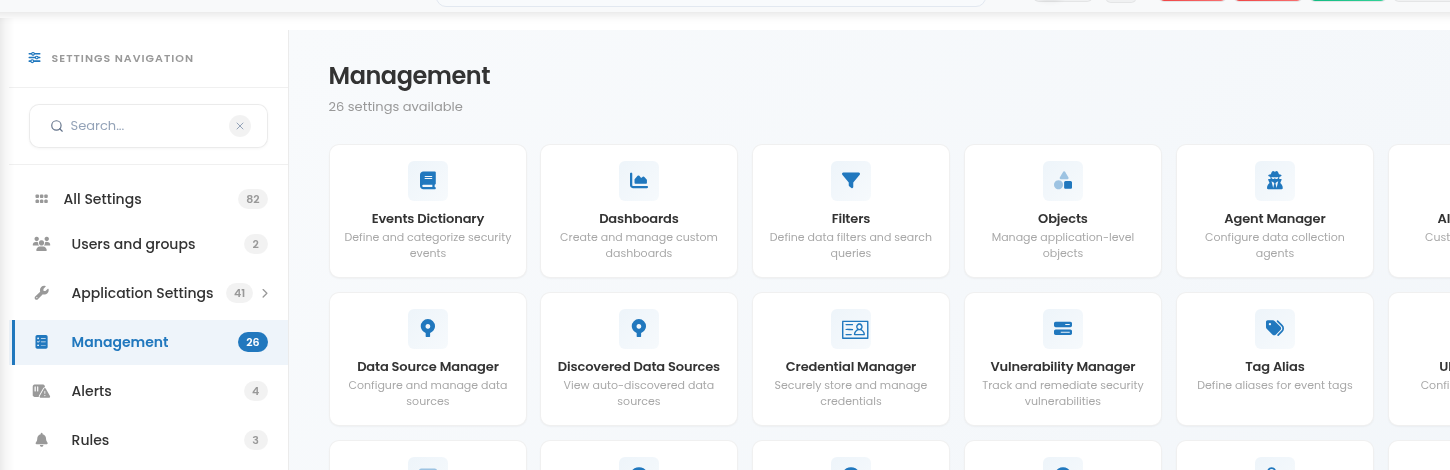
a) Navigate to Settings  in the left side of the interface where are the quick access buttons, then click Management > Tag Alias:
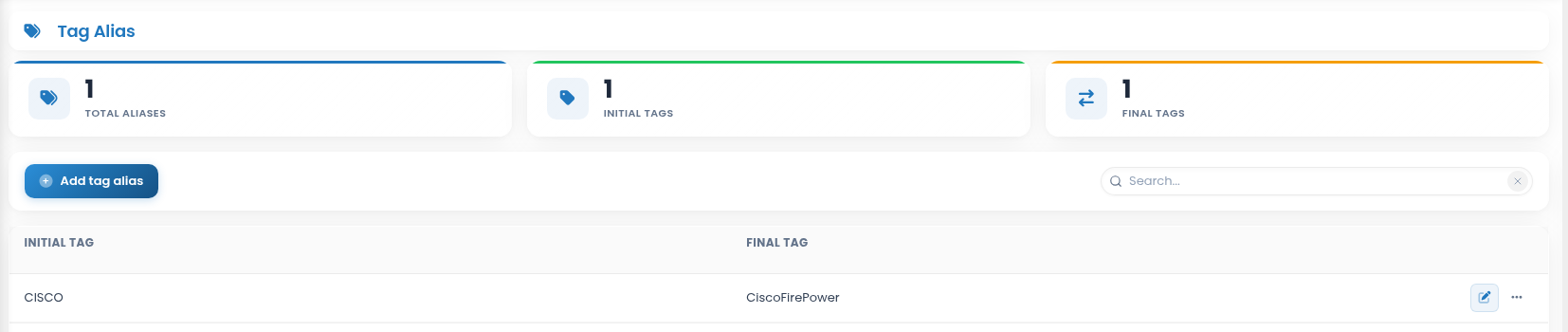
b) Tag Alias window will open:
To add a new Tag Alias that you found in Browser Module, press  button and the window will open:
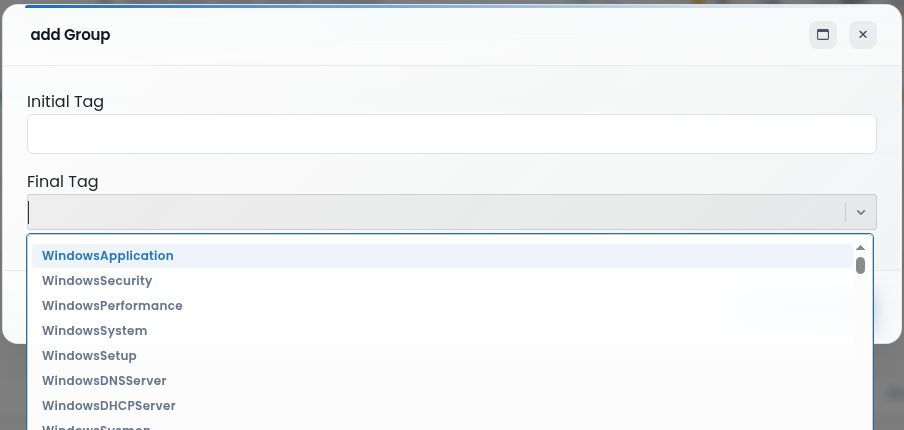
Complete the following:
- Initial Tag: the Tag which you found in Browser Module that is not processed in CYBERQUEST.
- Final Tag: you can choose from the predefined list the data sources tag. The events will be processed with the used Final Tag.
Edit  button on the right corner allows you to edit selected group.
To delete a group from the list, press  button next to it and select Delete. As a measure of precaution, you will be asked to confirm deletion.
Enhanced parsing
Enhance parsing is translating events and adding additional information to what Windows already provides. Windows Events Enricher adds the following information on the Forensics field:
- Who - describes who created the event
- What - the Category of the event
- Where - describes the location where the event occurred
- Why - describes why the event was created
For example, go to Browser Module and search the EventID: 4625 and you will find the category field which is named _FORENSICS. There you will see 4 forencsics fields of Windows Enricher:
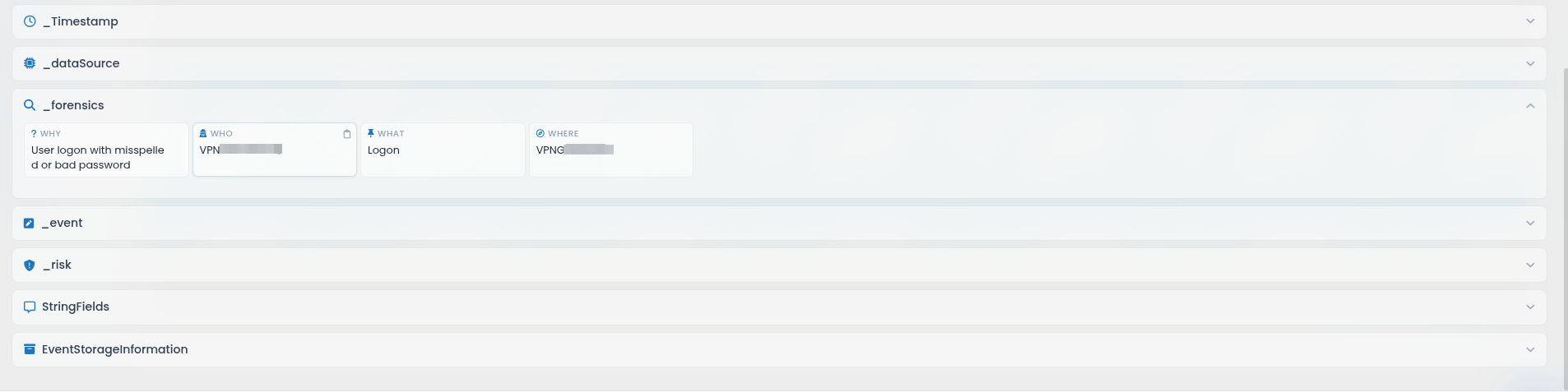
- Who: “UserName/Account Name”
- What: “Category”
- Where: “Computer”
- Why: ""